





Cookies Notice
This site uses cookies to deliver services and to analyze traffic.
📣 Guardian Agent: Guard AI-generated code


 Back
Back

Unified risk and vulnerability management across application, infrastructure, and code quality scanners, with code-to-runtime actionable context

Automated security controls validation and assurance based on your organization’s SDLC policies, with actionable context from your CMDB

Risk Graph policy engine and developer’s guardrails at every phase: design, development (pull request), and delivery (build/deploy)
Back



The recent compromise of the tj-actions/changed-files repository on March 14 caused significant security concerns. Now that the vulnerability was mitigated, the focus turns to preventing future incidents.
A personal access token (GitHub PAT) of an overly permissioned account was compromised, pushed a malicious commit to the tj-actions/changed-files repository, and repointed all existing tags to it. This exposed any GitHub secrets referenced in workflows invoking this action in logs. If those logs were public or accessible, sensitive credentials such as GitHub tokens and cloud access keys may have been compromised.
The vulnerability introduced by the malicious code, identified as CVE-2025-30066, was mitigated when the malicious script got deleted. Repositories in risk were those that referenced secrets alongside the compromised action in the same workflow file, were updated after the breach (otherwise exposure likelihood was very low), and were public or had the relevant workflow logs exposed somewhere. This accounts to a total of 340 repositories that got exposed to the risk (as gathered by this script).
Since then, Adnan Khan, who warned about such breach in ts-actions/changed-files over a year ago, discovered a related incident in a fork of reviewdog/action-setup, a transient dependency of the ts-actions/changed-files. The v1 tag, originally pointing to an old 2020 version, pointed to the fork’s malicious commit for two hours on March 11, 2025. No public repositories were found to use the infected tag. The short risk window and the long unused version make any compromise very unlikely. This incident is now tracked as CVE-2025-30154.
If you haven’t already, map all instances of both actions in your environments, check for any secrets referenced in those workflow files, and verify for leakage. If exposed, rotate them immediately.
One possible solution is to pin actions to specific commit hashes. Enforcing this globally across the organization ensures that only verified versions of the actions are used, instead of automatically pulling unverified updates. However, this solution has several caveats:
Beyond pinning actions, maintaining a healthy application security posture is seriously crucial in this area. You need the ability to immediately alert teams to any infected versions across the entire supply chain—from code to runtime. You need to detect exposed secrets globally, which is essential to prevent leaks of sensitive credentials. This is typically solved with an ASPM tool, as they are designed for such needs. Runtime detection is a good layer of defense in depth, but it’s generally preferable to first prevent incidents before they starts running.
Ultimately, the most robust defense against such incidents is zero-trust code management. This approach ensures that no code component is trusted until its safety has been verified, whether that code comes from an external library, an internal repository, or a public source.
For malicious code detection, the solution must be precise, with minimal false positives and minimal false negatives. This detection process should be flexible enough to be integrated at various entry points in the supply chain and must be a prerequisite before any code is pulled into the environment.
A month ago, Apiiro released open-source tools designed for this very purpose. These tools were developed based on research that identifies two patterns common in malicious code but rare in benign code: dynamic code execution and obfuscation. The recent incident is a textbook example of these patterns, both of which are detectable using these tools out of the box.
The secure way to handle GitHub Actions, and by extension, any software dependencies and any unfamiliar code—follows this simple process:
The malicious code detection part can be done using our recently published open-source malicious code detection ruleset. Users who followed this workflow would not have been affected by this incident.
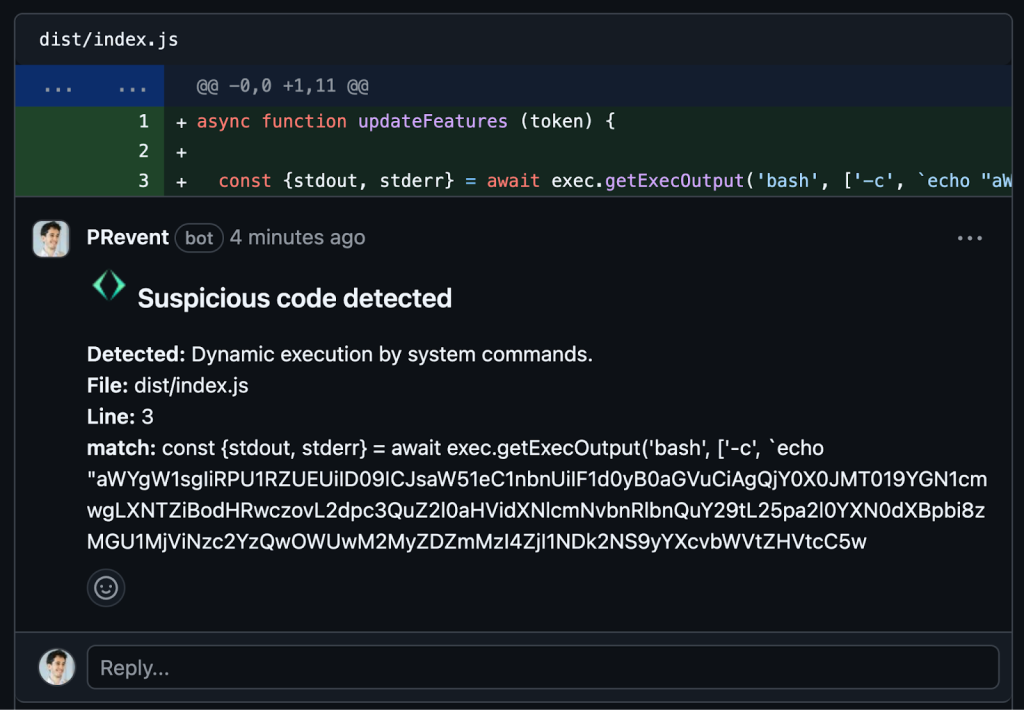
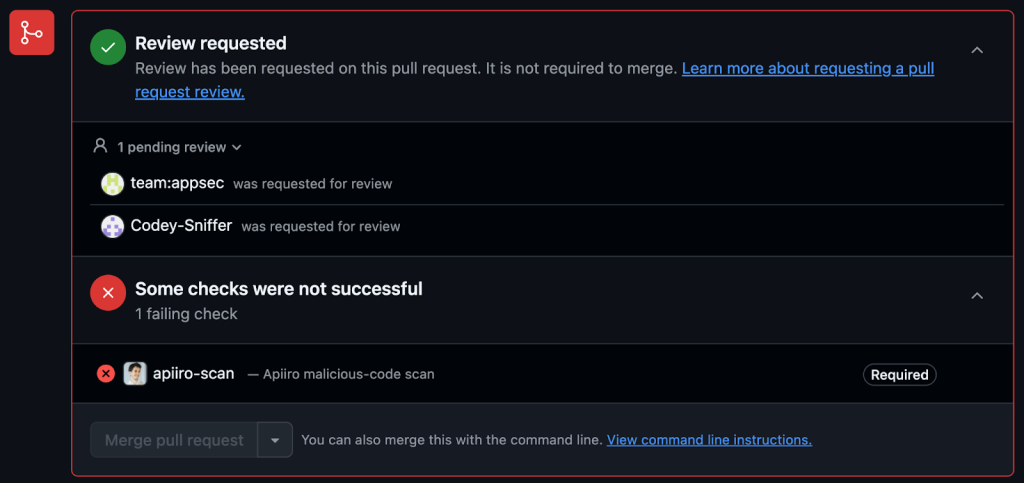
To get broad protection, not only against the specific use case of malicious code in actions, and not only in the rare case that it’s possible to enforce actions pinning globally, a good starting point is protecting your codebases using PRevent, a fully controlled GitHub app that detects and blocks malicious code. If the affected repository had been using PRevent, this incident would have been entirely prevented, automatically.
The malicious commit, as caught when added to a repo monitored by PRevent, using the ruleset (comments can be disabled for stealth and email alerts can be enabled):
PRevent blocks the commit, and triggers code reviews (customizable):
CVE-2025-30066 highlights the ongoing risks of supply chain attacks and the limitations of reactive security measures. While pinning dependencies helps reduce exposure, it doesn’t address the broader challenge of detecting and preventing malicious code at scale. A zero-trust approach to dependency management is essential. Every component must be verified before use, and proactive detection should be built into the development pipeline. With the right tooling, such as open-source malicious code detection and automated enforcement, organizations can move beyond patching individual incidents to systematically preventing them.
A strong application security posture is key to effective incident response. You need instant visibility across your entire software supply chain, along with full context to assess impact, necessary details, and act decisively. A contextual code-to-runtime ASPM platform like Apiiro delivers exactly that:

Efficient response also requires real-time alerting to the right personnel, automated workflows and policies enforcement, and most critically—comprehensive secret exposure management to prevent credential leaks:

Runtime detection is another valuable layer of defense, but the priority should first be on detecting and preventing incidents before execution, rather than relying on runtime detection to block attacks at the last moment.

This site uses cookies to deliver services and to analyze traffic.